Troubleshooting
Most SaveFlow Lite setup problems fall into a few categories.
Start with the scene validator badge. Then inspect the specific Source that owns the warning.
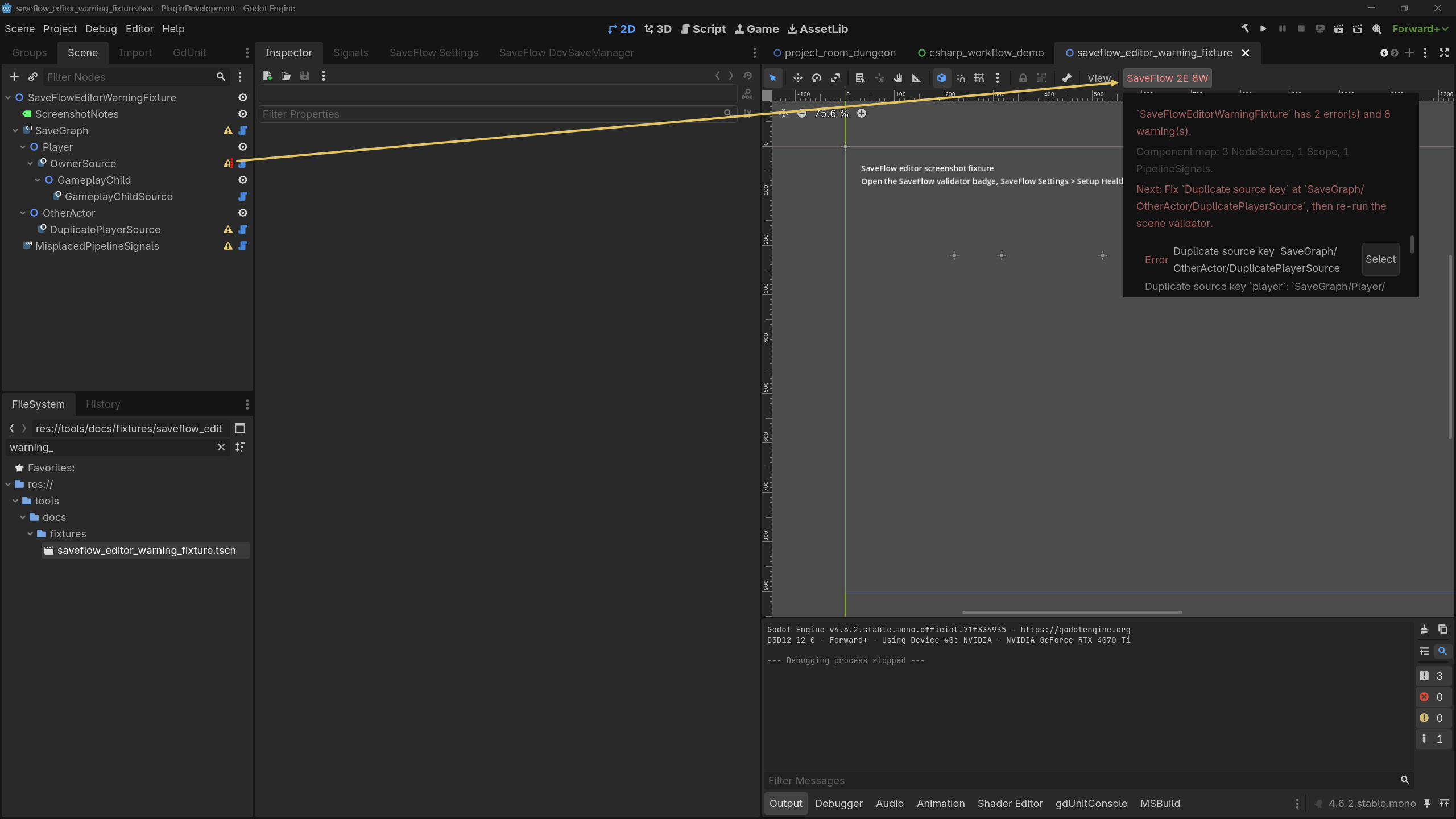
Duplicate Save Keys
Each Source in the same active save graph needs a stable, unique key.
Use the scene validator badge or Source warnings to find the duplicate node paths before testing save/load.
Fix:
- Select each reported Source.
- Give each one a stable, unique key.
- Prefer meaningful keys such as
player,settings, orruntime_coins. - Save and reload only after the validator no longer reports duplicate keys.
Nested Source Ownership
If a parent SaveFlowNodeSource recursively includes a child object that already
has its own Source, the graph becomes ambiguous.
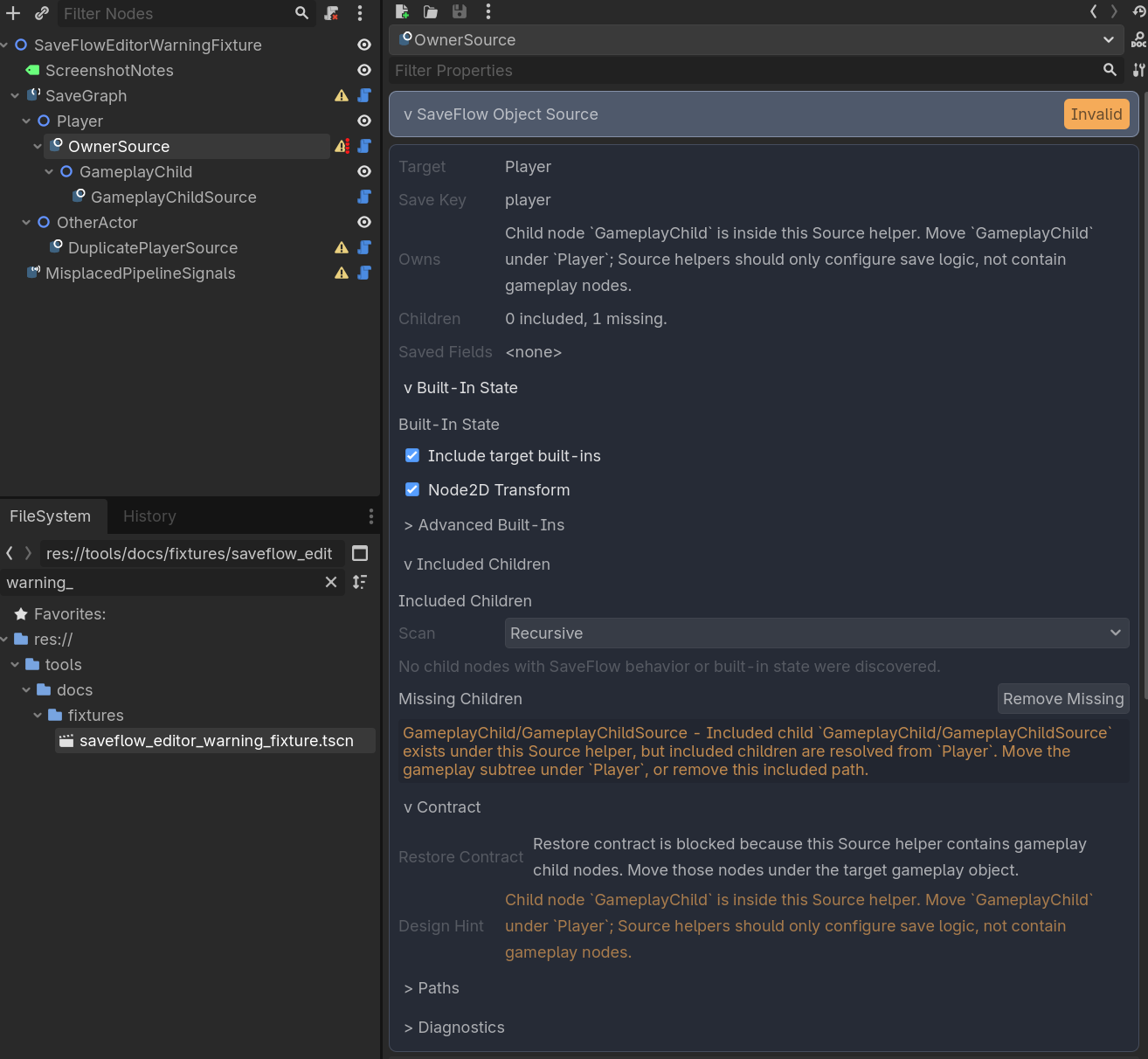
Fix it by including the child Source directly, or by removing the child Source if the parent truly owns that object.
Rule of thumb:
- if the child is part of the same object, let the parent own it
- if the child has its own identity or save lifecycle, give it its own Source
- if both are true, the scene probably needs a clearer boundary
Runtime Entity Containers
Do not save runtime entity containers as ordinary recursive node subtrees.
Use SaveFlowEntityCollectionSource so the entity list, identities, descriptors,
and factory restore path stay explicit.
Fix:
- Put
SaveFlowEntityCollectionSourceunder or near the runtime container. - Add
SaveFlowIdentityto runtime entity prefabs. - Set explicit
persistent_idvalues for authored runtime entities. - Set explicit
type_keyvalues that match factory routes. - Configure a prefab factory or custom entity factory.
- Exclude the runtime container from parent
SaveFlowNodeSourcesubtree saves.
If the Entity Collection preview shows a Next Action, fix that item first. It is built from the same plan data used by scene validator warnings.
Runtime Entity Did Not Restore
When a runtime entity is missing after load, inspect the restore report from
SaveFlowEntityCollectionSource or a direct SaveFlow.restore_entities() call.
Start with entity_restore_issues. The first issue is also mirrored in
first_issue for compact logging or UI.
Fix by code:
| Code | Fix |
|---|---|
INVALID_DESCRIPTOR | Check that saved entity descriptors are dictionaries or SaveFlowEntityDescriptor values. |
MISSING_TYPE_KEY | Set explicit type_key values that match entity factory routes. |
MISSING_PERSISTENT_ID | Set stable persistent_id values on SaveFlowIdentity nodes or descriptors. |
FACTORY_NOT_FOUND | Assign or register an entity factory that supports this type_key. |
EXISTING_ENTITY_NOT_FOUND | Use Create Missing, or make sure the entity exists before loading. |
SPAWN_RETURNED_NULL | Check the factory prefab, target container, and spawn logic. |
ENTITY_GRAPH_APPLY_FAILED | Inspect the entity's nested Source payload and apply failure. |
Use skipped_count to see how many descriptors were ignored, missing_types
to list unsupported routes, and failed_ids to find the saved descriptors that
need attention.
Slot Looks Wrong After Load
Check the active slot first.
Autosave and checkpoint flows should write to the active slot unless your game intentionally routes them elsewhere.
Then check slot metadata and save card summaries to confirm which slot was written.
Stale Built-In Selection
This happens when a SaveFlowNodeSource target changes type after built-ins or
field overrides were selected.
Fix:
- Select the Source.
- Open the built-in preview/foldout.
- Remove unsupported built-ins or field overrides.
- Re-select the state that actually exists on the current target type.
Missing Included Children
This happens when included_paths points to a child node that no longer exists.
Fix:
- Select the Source.
- Remove missing child entries.
- Re-add the child only if it is still part of the same saved object.
- If the child now has its own Source, include that Source directly instead.
Scene Path Blocks Load
If verify_scene_path_on_load is enabled, SaveFlow treats saved scene path as a
baseline restore safety check.
That means loading can fail before applying data when the saved slot belongs to a different scene.
Fix:
- load the expected scene first
- or disable scene-path verification if your project intentionally loads by key across scene paths
Disabling the check does not change how keys match payloads. It only removes the scene-path safety guard.